Calorie deficit tracker

Know your deficit.

Deficit counts the calories you eat against the calories you burn, so you always know exactly where you stand.

  • Track calories eaten and burned in one live gauge
  • Sync activity from Apple Health and Apple Watch, with WHOOP and Oura coming soon
  • Log meals by snapping a photo, searching or entering them yourself
  • See the projected date you'll reach your goal weight
Download on theApp Store
5.0 on the App Store · Free
Scan with your
iPhone camera
to download
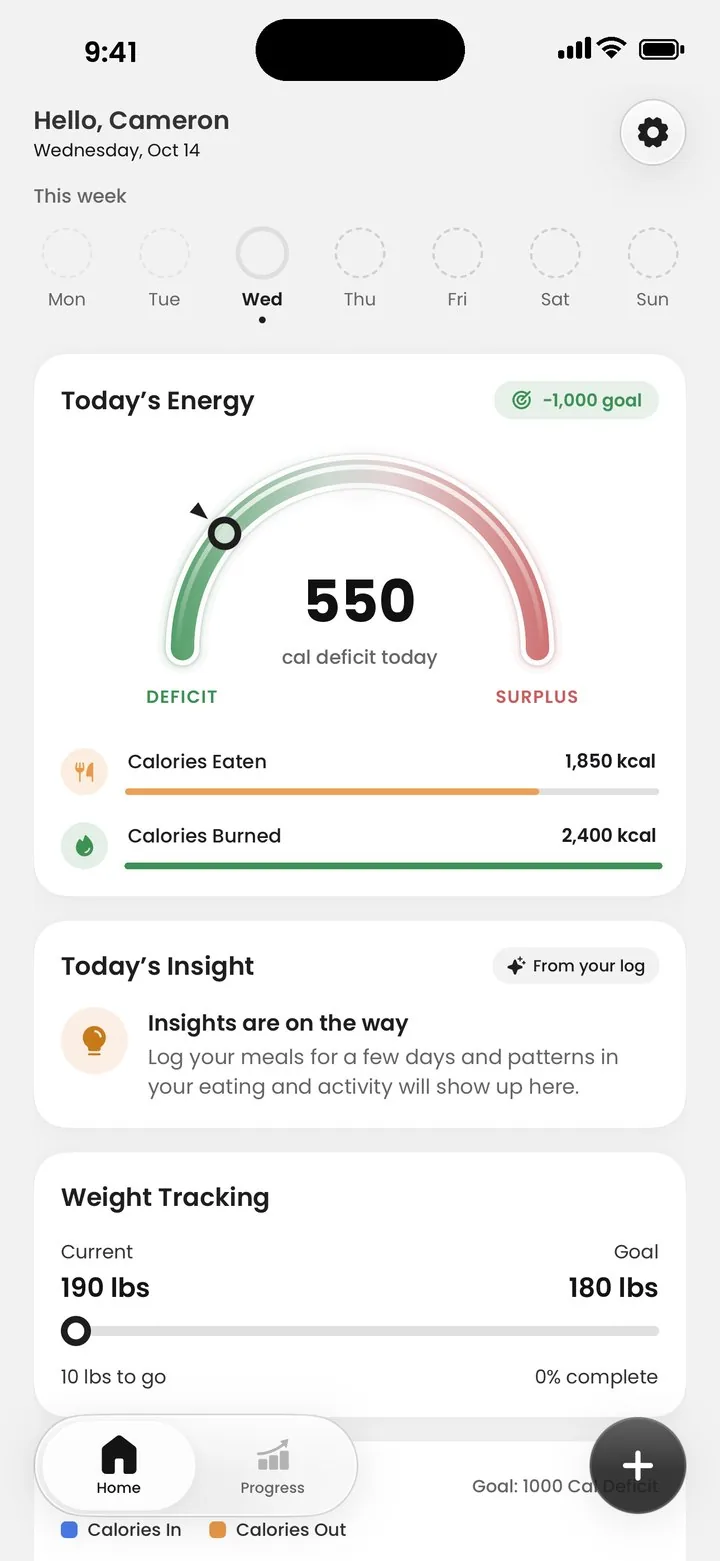
Deficit home screen with the Today's Energy gauge showing a 550 calorie deficit

Works with the devices you already wear

Apple HealthApple WatchWHOOPOura
The only equation that matters

Deficit does the math all day, automatically, from the meals you log and the activity your wearable records.

Why we built Deficit

Designed by a doctor to take the guessing out of weight loss.

Deficit was designed by a board-certified gastroenterologist with expertise in nutrition, who saw that most calorie-counting apps leave too much to guesswork.

A calorie deficit is the most reliable way to lose weight. So he built a way to know how many calories you burn each day, so you stay informed at every step of your weight loss journey.

Deficit isn't designed for people with a history of eating disorders, during pregnancy or breastfeeding, or for anyone under 18 without a doctor's guidance.

Five steps to your goal weight.

Tell us where you want to go and how fast. Deficit turns it into a daily number and keeps you on it.

Get started free
  1. Set your goal

    Tell us how much weight you want to lose.

  2. Choose your pace

    Tell us how much you want to lose per week, and we'll tell you exactly how many calories to burn per day to get there.

  3. Track calories in and out

    Log the calories you eat and the calories you burn, all within the app. Your wearable fills in the activity automatically.

  4. Stay on target all day

    Watch your deficit update throughout the day so you stay on target. No guessing. Know how much you're burning every day.

  5. Monitor your weekly progress

    Follow your progress week by week, with milestones and a projected date, as you close in on your goal.

Everything you need to stay in a deficit.

Every calorie in and every calorie out, in one place.

Your deficit, live.

One gauge shows whether you're in a deficit or a surplus right now, measured against the goal you set.

Snap it, search it or type it in.

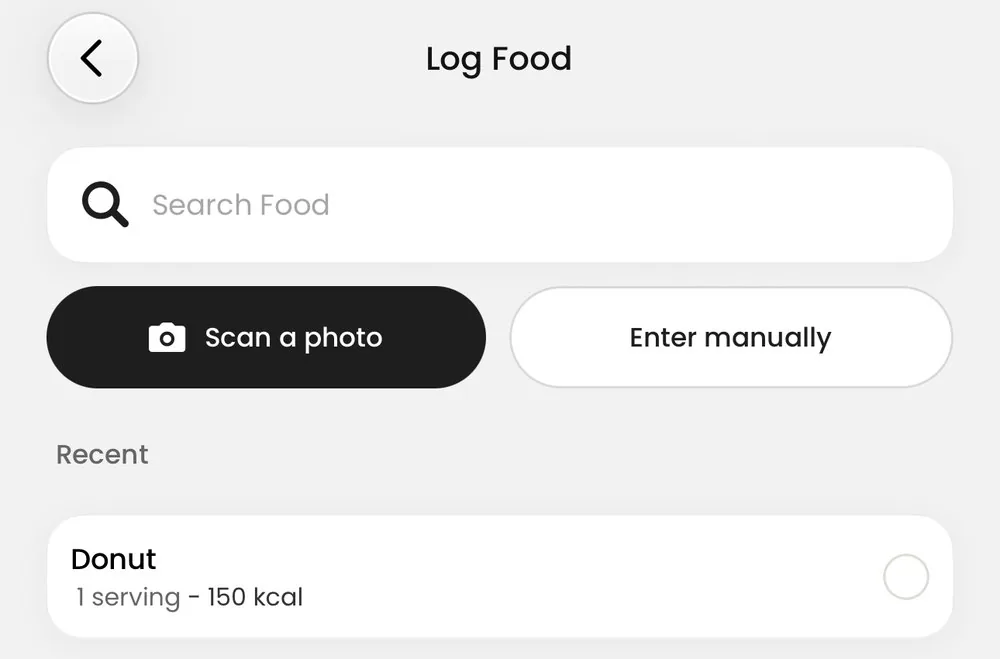
Log a meal in seconds. Take a photo of your plate, search for a food, or enter the calories yourself.

Log Food screen with food search, Scan a photo and Enter manually options, and a recent food

See where every calorie burned comes from.

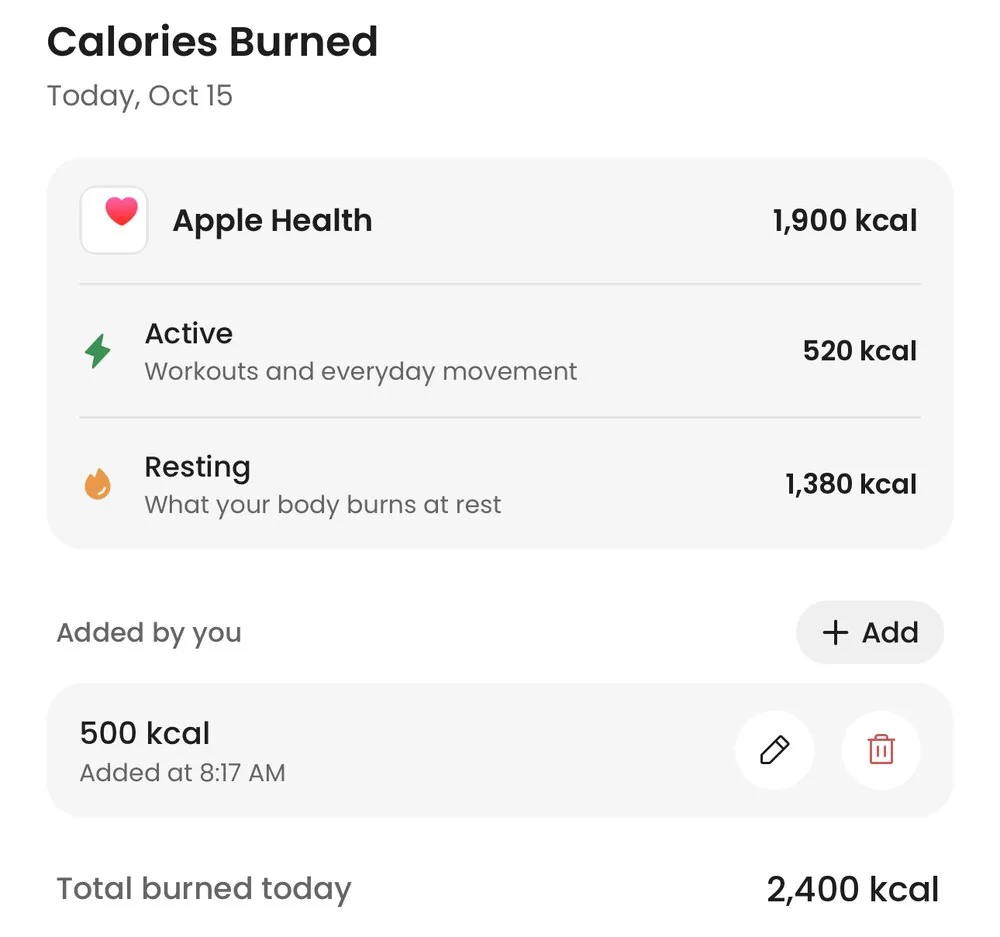
Active and resting calories from Apple Health, plus anything you add yourself, in one daily total.

Calories Burned screen showing Apple Health active and resting calories, a manually added entry and the daily total

See the week, not just the day.

One high day doesn't undo your progress. Compare calories in and out across the week and see how many days you hit your goal.

Example data

Know when you'll get there.

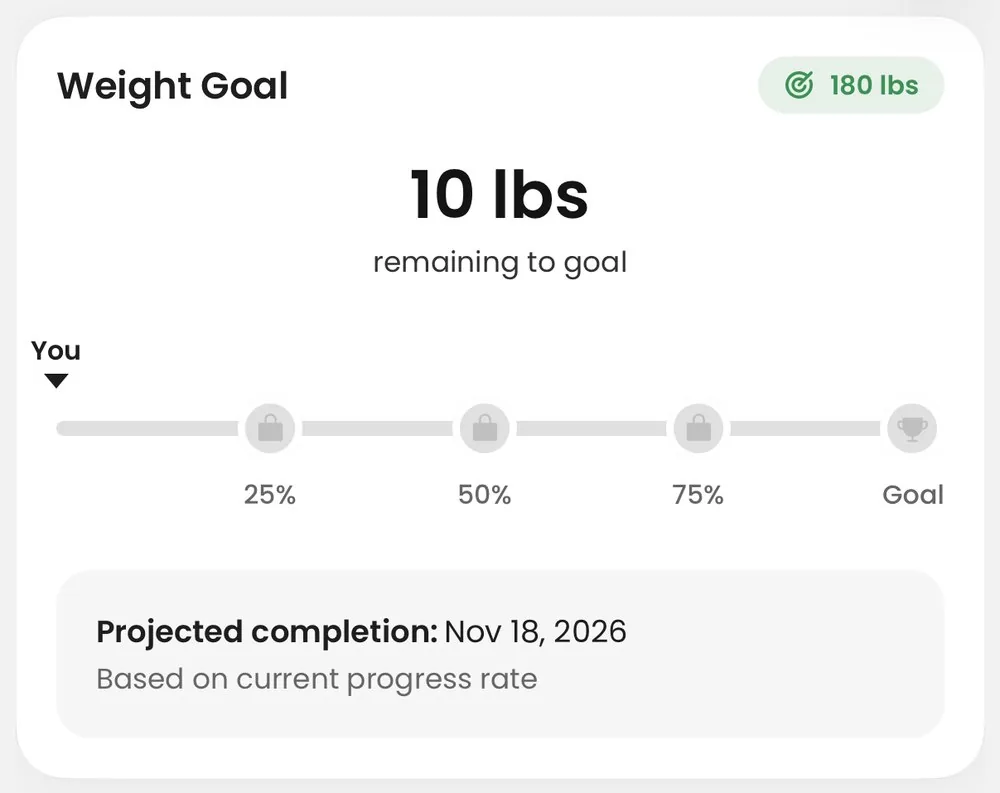
Pounds to go, milestones at 25, 50 and 75 percent, and a projected date based on your real progress.

Weight Goal card showing 10 pounds remaining, milestones and a projected completion date

Personalized target

A daily deficit goal built from your weight goal and pace.

Daily streaks

A streak counter rewards logging day after day.

20 achievements

Badges for milestones, starting with your first meal.

Apple Health sync

Active and resting calories flow in from Apple Health automatically.

“Easy to use. Accurate comprehensive features.”
Great toolApp Store review

Questions, answered.

Can't find what you're looking for? Email support@deficitapp.com.

Is Deficit free?

Yes. Deficit is free to download and use on iPhone, with no subscriptions or in-app purchases.

How does Deficit count the calories I burn?

Deficit adds up your active calories (workouts and everyday movement) and resting calories (what your body burns at rest) from Apple Health, plus anything you add yourself, into one total for the day. Wearables that sync with Apple Health, like Apple Watch, are included automatically.

Do I need a wearable?

No. You can add calories burned yourself at any time. Connecting Apple Health or a wearable fills in your active and resting calories automatically, so you don't have to.

Which devices and apps does Deficit work with?

Apple Health and Apple Watch, plus any device that shares its activity with Apple Health, such as WHOOP and Oura. Direct WHOOP and Oura connections are coming soon.

How is my daily calorie target set?

Tell us how much weight you want to lose and how much you want to lose per week. Deficit turns that into a daily calorie deficit and shows you how many calories to burn each day to stay on pace.

Is my health data private?

Yes. We never sell your personal or health data and never use it for advertising. Read the details in our Privacy Policy.

Is there an Android version?

Not yet. Deficit is available on iPhone and requires iOS 15.1 or later.

Is Deficit medical advice?

No. Deficit is a tracking tool for general wellness and is not a substitute for advice from your doctor. Talk to a healthcare professional before starting a diet or exercise program.

Who shouldn't use Deficit?

Deficit isn't designed for people with a history of eating disorders, people who are pregnant or breastfeeding, or anyone under 18 without a doctor's guidance. If you have a medical condition or take medication that affects your weight or appetite, check with your doctor first.

How do I delete my account and data?

You can delete your account from the app's settings, or ask us to do it. See how to delete your account.

How do I contact support?

Email us at support@deficitapp.com and we'll get back to you.

Your health data stays yours.

We never sell your personal or health data, and we never use it for advertising.

Read our Privacy Policy
Deficit app icon

Start your deficit today.

Free on iPhone. Requires iOS 15.1 or later.

Download on theApp Store
DeficitFree on iPhone Download